Session VWAP with Measured Band Reach
VWAP with Measured Bands: a free TradingView indicator
How often did price reach each VWAP band, against the same distance from the open?
- Free
- Open source
- Every percentage with its n
- No signals
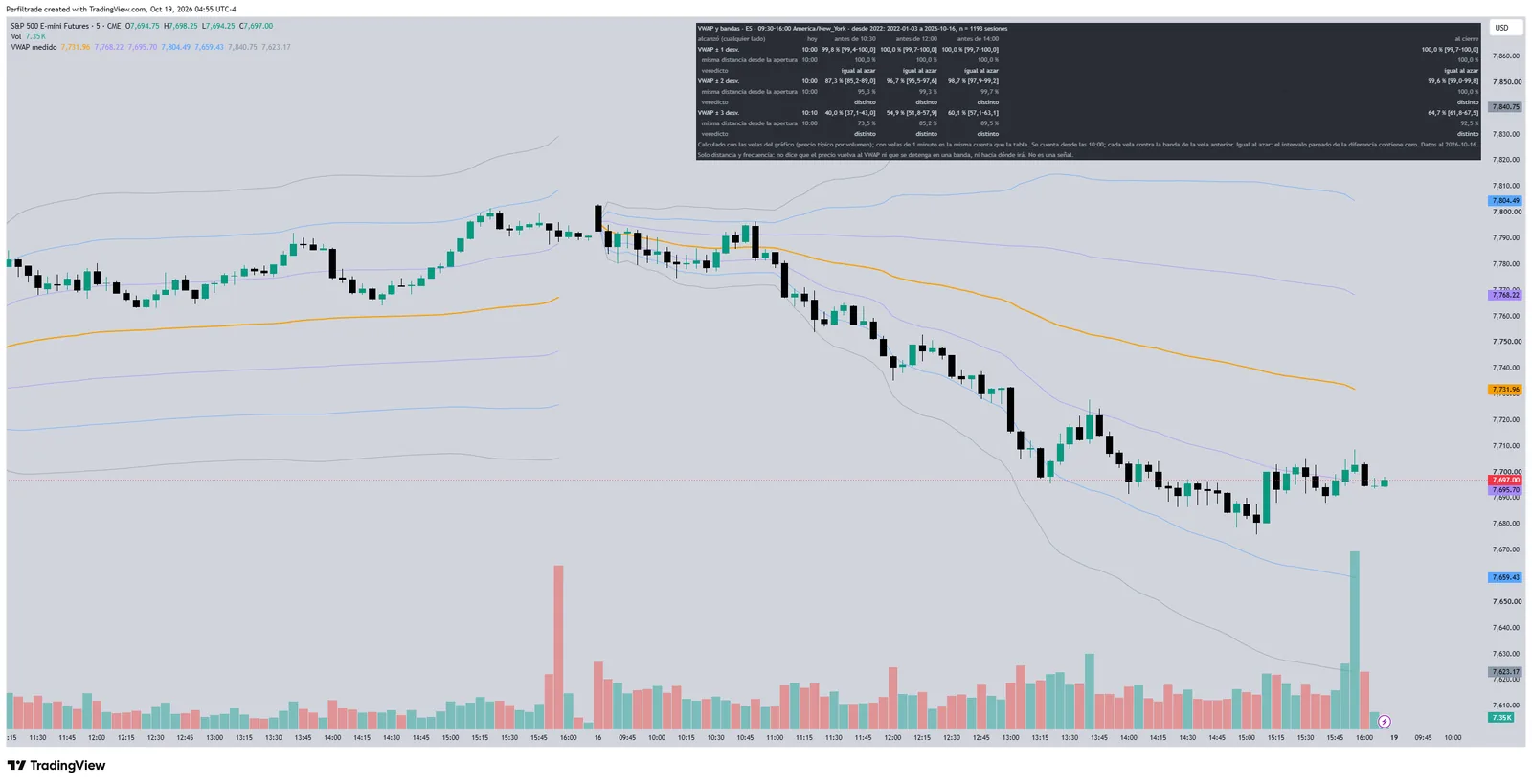
- Regular-session VWAP with 1, 2 and 3 standard-deviation bands, computed from the chart's bars.
- How often each band was reached by 10:30, 12:00, 14:00 and the close since 2022, against the same distance from the open, with its n and verdict.
- Distance and frequency only: it does not say price returns to the VWAP or stops at a band.
How it is computed
Each bar adds its typical price weighted by volume from the regular-session open, and the bands are weighted deviations around the VWAP. Touches count from 10:00, against the band known at the previous bar. Statistics for 8 markets; elsewhere it draws the line without the table.
How to add it
- Open it on TradingView and press "Use on chart" or "Add to favorites".
- Or copy the code, open TradingView's Pine editor, paste it and press "Add to chart".
The measurement behind it
One of our guides' tables on the same thing the indicator measures, with its sample and its date range.
VWAP bands in ES: how often they are reached before the close
ES
Swipe to see the sample →
| Band | Reached before the close | Same distance from the open | Sessions |
|---|---|---|---|
| ±1 standard deviation | 100.0% | 100.0% | 1,193 |
| ±2 standard deviations | 99.6% | 100.0% | 1,193 |
| ±3 standard deviations | 64.7% | 92.5% | 1,193 |
n = 1,193 · 2022-01-03 to 2026-10-16 · historical futures data
ES, regular session (9:30-16:00 ET), 3-Jan-2022 to 16-Oct-2026: 1,193 sessions. VWAP = sum of typical price times volume divided by volume, from the first minute of the session; bands = VWAP plus and minus 1, 2 and 3 standard deviations of those prices, weighted by volume. Computed from 1-minute bars (an approximation of the trade-by-trade VWAP). A touch counts from 10:00 ET, against the band known at the close of the previous minute, on either side. Control: the same distance measured from the open, in the same session. ±1: 100.0% [99.7–100.0], same as chance; ±2: 99.6% [99.0–99.8], difference −0.4 pp [−0.8 to −0.1]; ±3: 64.7% [61.8–67.5], difference −27.7 pp [−30.6 to −24.9]. The outer bands are reached less often than the same distance from the open because the VWAP moves with price. Distance and frequency only: it does not say that price returns to the VWAP or stops at a band; it is what happened, not a signal.
Frequently asked questions
Are they free?
Yes. All of them are public and open source on TradingView, and you add them with a free account. TradingView's free plan limits how many indicators you can have on a chart at once.
Do they repaint?
Key Levels and Setup State fix each level when its period or window ends; only the table updates inside the bar. The Session Profile of the session in progress changes until the close, and a finished session's profile no longer changes.
What data do they use?
The data of the chart you open them on. The historical frequencies are embedded in the indicator and say up to which date they were measured and over how many sessions.
Why do they give no signals?
Because a historical percentage describes how much and how often the market moved in the past, not where it will go today. That is why every figure comes with its sample and none of them suggests trades.
All indicators
- IB and gapHow often did a gap like today's fill?
- Key LevelsHow far did price travel from the open in past sessions?
- Setup StateWhat state are today's gap, Initial Balance and opening range in?
- Session ProfileWhere did price spend the most time during the session?
- COT PositioningWhere is each group positioned, and what happened after similar readings?
- Volatility by Time of DayHow much does each half hour of the session usually move, and how much did it move today?
- Open TypeWhat kind of open did the session have, and what did sessions do after opens like it?
- Macro Release DaysWhich US releases are coming, and how much does the first hour usually move after each?