Volatility by Time of Day
Volatility by Time of Day: a free TradingView indicator
How much does each half hour of the session usually move, and how much did it move today?
- Free
- Open source
- Every percentage with its n
- No signals
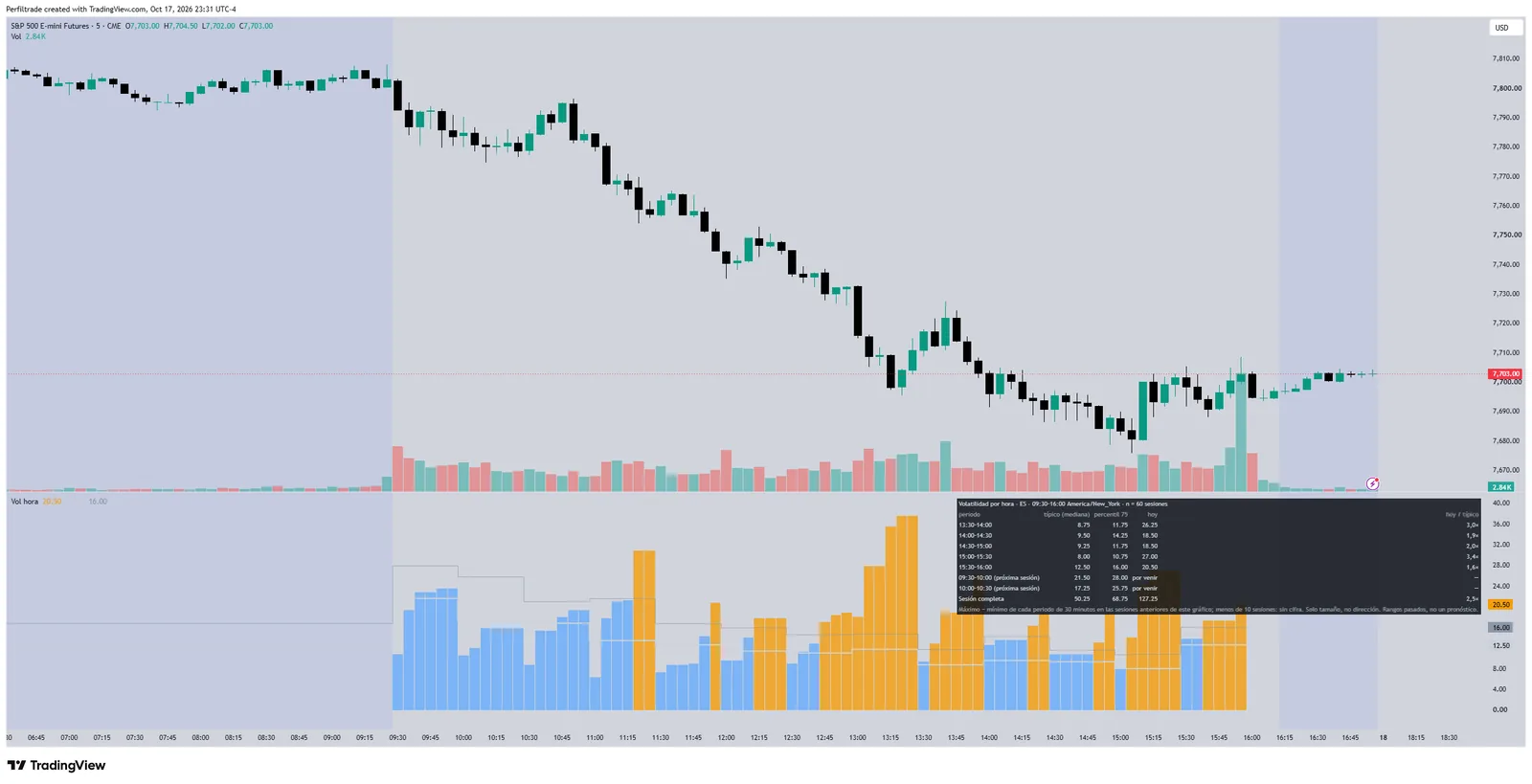
- The typical range (median) and the 75th percentile of each half hour, from your own chart's data, against today's range.
- A table with the latest half hours, the next two with their clock time and the whole session against its typical value.
- Size only: it says how much each period moved before, not where.
How it is computed
Each period starts at the market's own session open (9:30 to 16:00 New York for index futures, 8:20 to 13:30 for gold). It compares against the last 60 finished sessions on the chart; with fewer than 10, the period shows no figure. Holidays and short sessions are not adjusted. 1 to 30 minute charts.
How to add it
- Open it on TradingView and press "Use on chart" or "Add to favorites".
- Or copy the code, open TradingView's Pine editor, paste it and press "Add to chart".
The measurement behind it
One of our guides' tables on the same thing the indicator measures, with its sample and its date range.
Macro data days in ES: the first hour against the whole session
ES
Swipe to see the sample →
| Release | First hour after the release vs a normal hour | Whole regular session vs a normal day | Whole regular session, full history | Releases |
|---|---|---|---|---|
| CPI (inflation), 8:30 ET | 4.0 × | 1.19 × | 1.09 × | 59 |
| Employment report (NFP), 8:30 ET | 3.1 × | 1.29 × | 1.11 × | 57 |
| FOMC (Fed decision), 14:00 ET | 3.5 × | 1.63 × | 1.40 × | 40 |
| FOMC: the next session | -- | 1.18 × | 1.23 × | 40 |
| FOMC: two sessions later | -- | 1.15 × | 1.09 × | 40 |
n = 156 · 2021-10-08 to 2026-09-16 · historical futures data
The first two columns and 'Releases' use the releases from 1-Oct-2021 to 30-Sep-2026, the same window as the table of the first hour on macro data days; the third uses the full history since June 2010 (192 CPI, 189 employment reports, 130 decisions). First hour = high minus low from the release minute to 59 minutes after it (8:30-9:29 ET for CPI and employment, before the 9:30 open; 14:00-14:59 ET for the FOMC), over the median of that same hour in the 20 previous sessions without any of the 7 releases (CPI, NFP, PPI, retail sales, GDP, PCE, FOMC). Whole session = regular-session range (9:30-16:00 ET) over the median regular-session range of those same 20 previous sessions; in the rows for the next session and two sessions later, the range is that session's and the normal day is still the one known before the FOMC. Each cell is the median across releases; on days without a release the same ratio has a median of 0.99. 95% confidence intervals of the whole session (resampling releases), 2021-2026 window: CPI 1.19 [1.02 to 1.35], employment 1.29 [1.12 to 1.53], FOMC 1.63 [1.42 to 1.94], next session 1.18 [1.04 to 1.38], two later 1.15 [0.99 to 1.39]; full history: CPI 1.09 [0.97 to 1.19], employment 1.11 [1.01 to 1.20], FOMC 1.40 [1.25 to 1.54], next session 1.23 [1.13 to 1.47], two later 1.09 [0.99 to 1.22]. In the last 3 years (since 1-Oct-2023) the whole session measured 1.16 on CPI, 1.44 on employment and 1.46 on FOMC. Reading: the jump is concentrated in the first hour; over the whole session a CPI day is only slightly wider than a normal one, while the FOMC day is clearly wider and the effect is still visible in the next session and, more weakly, in the second (its interval touches 1). It measures size, not direction. ES front contract, 1-minute bars.
Frequently asked questions
Are they free?
Yes. All of them are public and open source on TradingView, and you add them with a free account. TradingView's free plan limits how many indicators you can have on a chart at once.
Do they repaint?
Key Levels and Setup State fix each level when its period or window ends; only the table updates inside the bar. The Session Profile of the session in progress changes until the close, and a finished session's profile no longer changes.
What data do they use?
The data of the chart you open them on. The historical frequencies are embedded in the indicator and say up to which date they were measured and over how many sessions.
Why do they give no signals?
Because a historical percentage describes how much and how often the market moved in the past, not where it will go today. That is why every figure comes with its sample and none of them suggests trades.
All indicators
- IB and gapHow often did a gap like today's fill?
- Key LevelsHow far did price travel from the open in past sessions?
- Setup StateWhat state are today's gap, Initial Balance and opening range in?
- Session ProfileWhere did price spend the most time during the session?
- COT PositioningWhere is each group positioned, and what happened after similar readings?
- Open TypeWhat kind of open did the session have, and what did sessions do after opens like it?
- VWAP with Measured BandsHow often did price reach each VWAP band, against the same distance from the open?
- Macro Release DaysWhich US releases are coming, and how much does the first hour usually move after each?